Beam Analysis.
Inside Excel.

The beam analysis tool that should have been built into Excel years ago. Link cells, get live results, export diagrams — without leaving your spreadsheet.

🎉Try BeamBuddy Pro free for 14 days — no credit card required!
See Plans & Pricing

✓ No credit card required

Already a customer? Log in here

Works with
📊Excel
🏗️BS 5950
🇪🇺Eurocode
☁️Microsoft 365

From install to results in minutes

No training course. No IT request. No licence dongle. Just beam analysis, in Excel, right now.

⬇️
Step 01

Install

Search for BeamBuddy in Excel's Add-ins menu and click Add. Takes less time than making that coffee.

📐
Step 02

Link

Point your loads and span at Excel cells you already have. Your existing data becomes the input.

Step 03

Analyse

Reactions, SFD, BMD, deflections — all live. Change a cell, everything updates. Results write back to wherever you need them.

Everything you need.
Nothing you don't.

Not a toy calculator. A proper analysis tool that lives where you already work.

Bidirectional Cell Linking

Your loads come from cells. Your results write back to cells. Change a value in Excel — the beam recalculates instantly.

Parametric Design Studies

Link your beam span to cell B2 and sweep values from 3m to 12m. Reactions, moments, and deflections update live in your worksheet — no re-entering anything. Chain results into downstream calcs like connection design or foundation sizing, all inside one workbook.

  • 2-second live polling
  • Links persist in .xlsx
  • Chain into wider calcs

Every Load Type You Need

Point loads, UDLs, trapezoidal, triangular, moments, self-weight — plus load arrays for equally-spaced repetitive loads.

Real-World Load Modelling

Model actual loading conditions — not simplified approximations. Trapezoidal loads for soil pressure, triangular for hydrostatic, moment loads for cantilever brackets, and load arrays for equally-spaced purlins or joists. Each one can be cell-linked independently.

  • 7 load types
  • Load arrays for repetitive loads
  • All cell-linkable

Diagrams as Excel Shapes

SFD, BMD, and deflection diagrams export as actual resizable shapes in your worksheet. Not screenshots — real vector shapes.

Print-Ready Reports

Export shear force, bending moment, and deflection diagrams directly into your worksheet as native Excel shapes. Resize them, move them, and they stay crisp at any scale. One-click re-export updates them in place when your model changes — no deleting and re-inserting.

  • Vector shapes, not images
  • Properly labelled axes
  • One-click re-export

FEM Analysis Engine

Proper finite element method. Multi-span continuous beams, spring supports, any configuration. This isn't a wL²/8 calculator.

Multi-Span Continuous Beams

The solver assembles a global stiffness matrix from Euler-Bernoulli beam elements, applies boundary conditions, and solves Ku = F directly. That means proper moment redistribution across continuous spans, realistic spring supports with rotational and translational stiffness, and accurate deflection profiles — not textbook approximations.

  • Global stiffness matrix
  • Spring supports
  • Any span configuration

397 Steel Sections

Full UK Universal Beams, Columns, PFCs, plus European IPE, HEA, HEB, HEM. Rectangular, square, and circular hollow sections.

Quick Section Comparison

Pick a section from the full catalogue and see results instantly. Swap between a 457x191 UB and a 533x210 UB in two clicks to compare utilisation. All section properties — area, second moment, plastic modulus, root radius — are built in and verified against published data.

  • UK, European & hollow sections
  • Instant swap
  • Verified properties

Projects Save With Your Workbook

Your beam analysis lives inside the .xlsx file. Open the workbook, your beams are there. No separate files, no cloud login required.

Collaboration & Handover

Email the .xlsx to a colleague and they open it with the full beam model intact — loads, supports, cell links, everything. No project files to lose, no cloud accounts to set up. The analysis travels with the workbook because it's stored in Excel's custom XML metadata.

  • Stored in .xlsx metadata
  • No cloud dependency
  • Full model portability

See it in action.
Right inside your spreadsheet.

Your loads come from cells. Your results go back to cells. Your diagrams sit in the worksheet. This is beam analysis that actually fits your workflow.
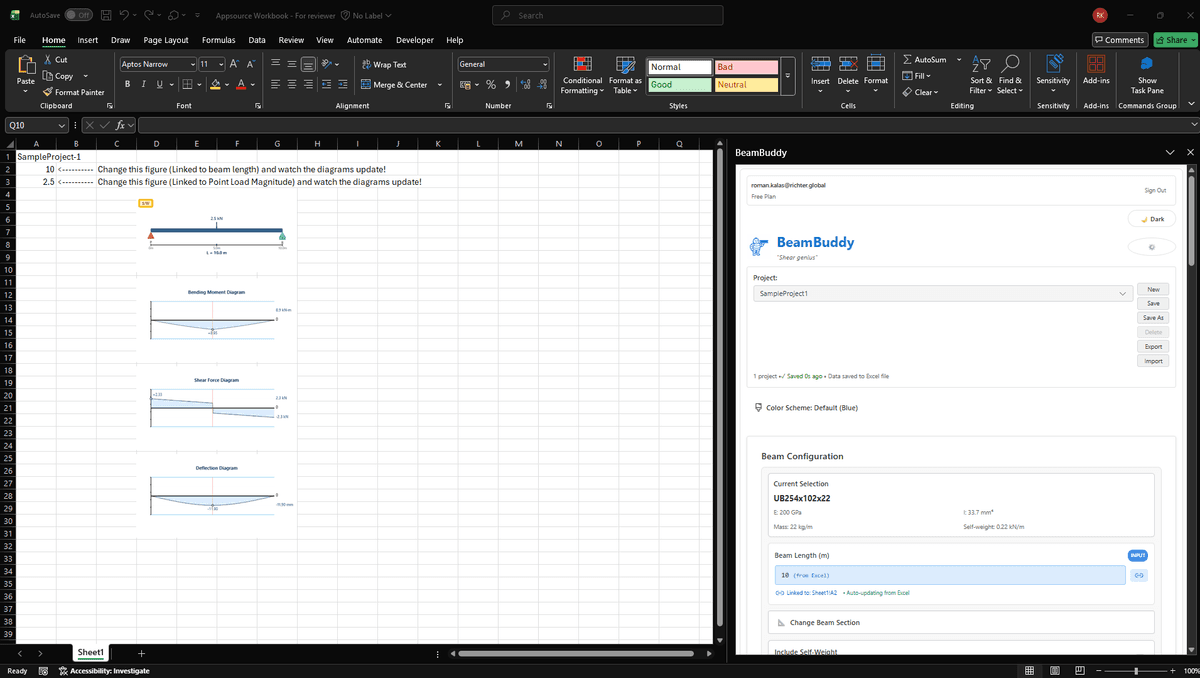
BeamBuddy Interface
⚡ Live Updates
🔗

Bidirectional Cell Linking

Loads read from cells. Results write to cells. Change a value anywhere — everything updates.

📈

Real Excel Shapes

SFD, BMD, and deflection diagrams export as resizable vector shapes. Move them, scale them, print them.

🏗️

Serious Analysis

FEM engine handles continuous beams, spring supports, trapezoidal loads — far beyond what simple calculators offer.

💾

Lives in Your Workbook

Every beam project saves with the .xlsx file. Open it tomorrow, next month, or send it to a colleague.

Try it free in your browser

No signup required — analyse a beam right now

Try it free.
Less than a coffee.

14 days free. No card. Then £1.99/month for a proper beam analysis tool inside Excel.

💳No credit card required to start

Continuous beams, 397 sections, live cell linking

Everything you need to analyse a beam without leaving your spreadsheet. Full access for 14 days, free.

Then £1.99/month — your morning coffee costs more than this.

Full Pro access for 14 days
💳No credit card needed
Then £1.99/mo — less than a coffee
Cancel anytime

Team plans from £0.99/user/month. For firms that want every engineer to have beam analysis in Excel.

Questions?
We have answers.

Everything you need to know about BeamBuddy.

Still have questions?

Contact Support

Stop leaving Excel
to check a beam.

Multi-span continuous beams, 397 sections, trapezoidal loads, spring supports, FEM engine — for £1.99/month. Less than a coffee.

✓ No credit card required

14-day free trial • No credit card • Full Pro access • Cancel anytime

BS5950 Compliant
Secure & Private
Cancel Anytime